Unikia Rcomp
Rcomp app icon: a white zipper on a blue rounded square

Rcomp

Upcoming release

Rust based crate library, command-line tool and app

Unified tool for every format, now even faster.

Rcomp reads and writes zip, 7z, tar, gzip, bzip2, xz, zstd, lz4 and brotli, and extracts rar. It works out the format from the file, checks every path before it writes, and never leaves half an archive behind. Fastest compression and decompression using all hardware capabilities.

10
formats: 6 codecs, 4 archive types
6/6
codecs compress on all cores
10.4×
faster bzip2 on 16 cores
3
platforms: macOS, Windows, Linux
4
GPUs put through qualification
7
releases since 12 June 2026

New in 0.5.0

Multithreaded compression for LZ4, gzip, bzip2 and brotli

zstd and xz already ran on all cores. LZ4, gzip, bzip2 and brotli now join them. Rcomp cuts the input into chunks, compresses them side by side, and writes them back in order as one standard stream. The reference lz4, gzip, bzip2 and brotli tools read it like any other file.

rcomp footage.tar footage.tar.lz4
16 coresindependent 4 MiB blocks
One output stream, in input order

573 MiB tar, 16 cores
0.4.0
0.5.0

Measured on an Apple M3 Max. Details under Speed.

  • Four more codecs on all cores

    LZ4, gzip, bzip2 and brotli, at every level. The output is the same whatever the number of cores, and at most 0.4% larger than before.

  • Smaller brotli

    Output at --fast and --best is about 10% and 25% smaller on a test archive of source files.

  • The CLI ships with the desktop app

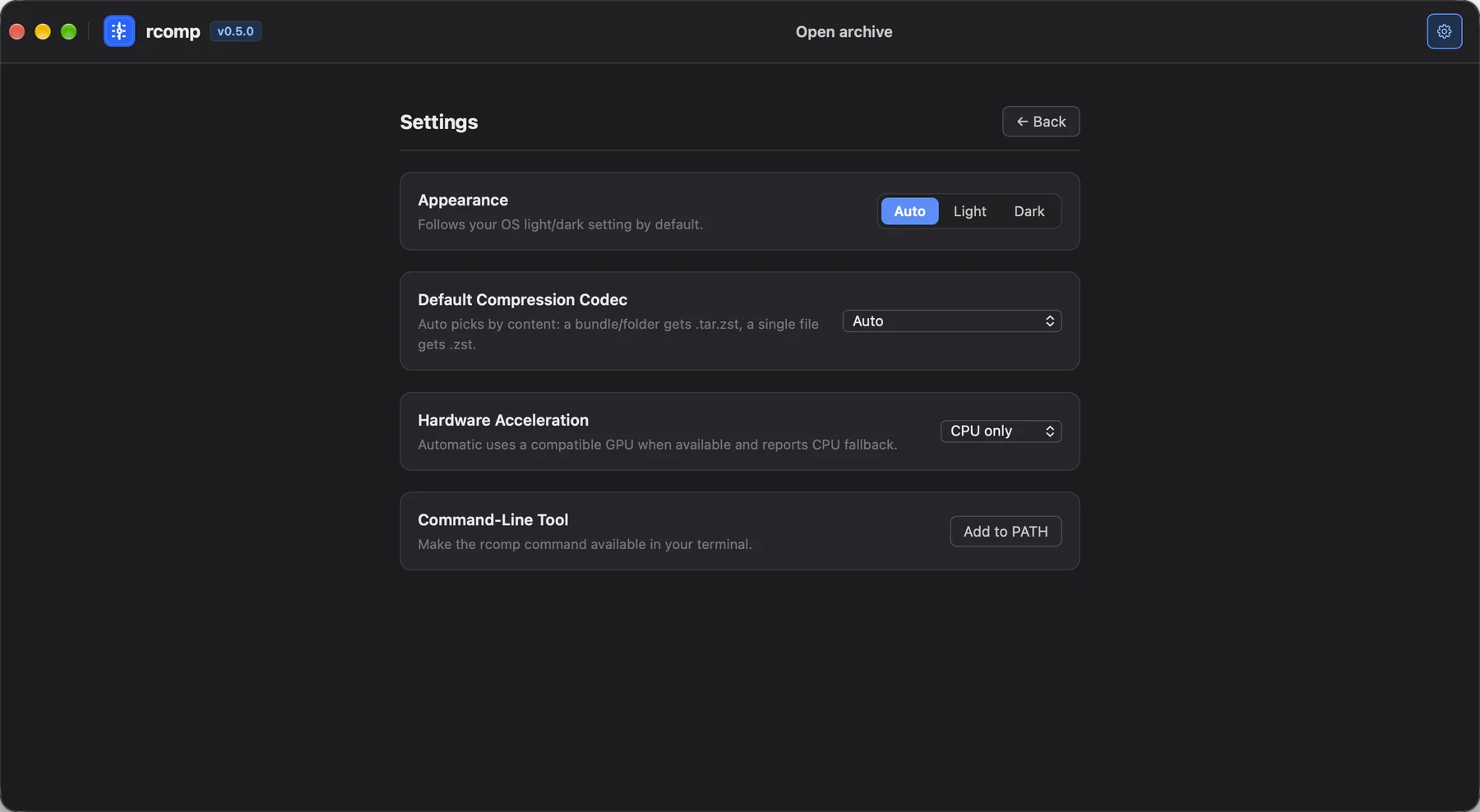
    Settings → Command-Line Tool → Add to PATH puts rcomp in every new terminal. An rcomp you installed another way is never replaced.

  • GPU errors that say why

    --accelerator required now names the device it could not find, or what a present device lacks, and suggests auto or cpu.

  • Finder Quick Actions get your selection

    Compress with Rcomp and Decompress with Rcomp used to open the app and ignore the files you picked. Fixed.

  • What it costs
    • · More memory on a 16-core machine: about 120 MiB for gzip, up to 200 MiB for bzip2, up to 300 MiB for LZ4
    • · Brotli: about 300 MiB at --fast, 500 MiB at --best, 1.2 GiB at --edge, which uses at most four cores
    • · .lz4 files use independent 4 MiB blocks, still with block and content checksums
NewDesktop app

The desktop app includes the command-line tool

Every desktop bundle now carries the rcomp command. One button in Settings makes it available in your terminal.

macOS
Links /usr/local/bin/rcomp to the copy inside the app
Windows
Adds the app's bin folder to your user Path
Linux
.deb and .rpm install /usr/bin/rcomp. The AppImage copies it to ~/.local/bin
Rcomp Settings in dark mode: Appearance, Default Compression Codec, Hardware Acceleration, and a Command-Line Tool row with an Add to PATH button

Desktop app

Desktop app for macOS, Windows and Linux

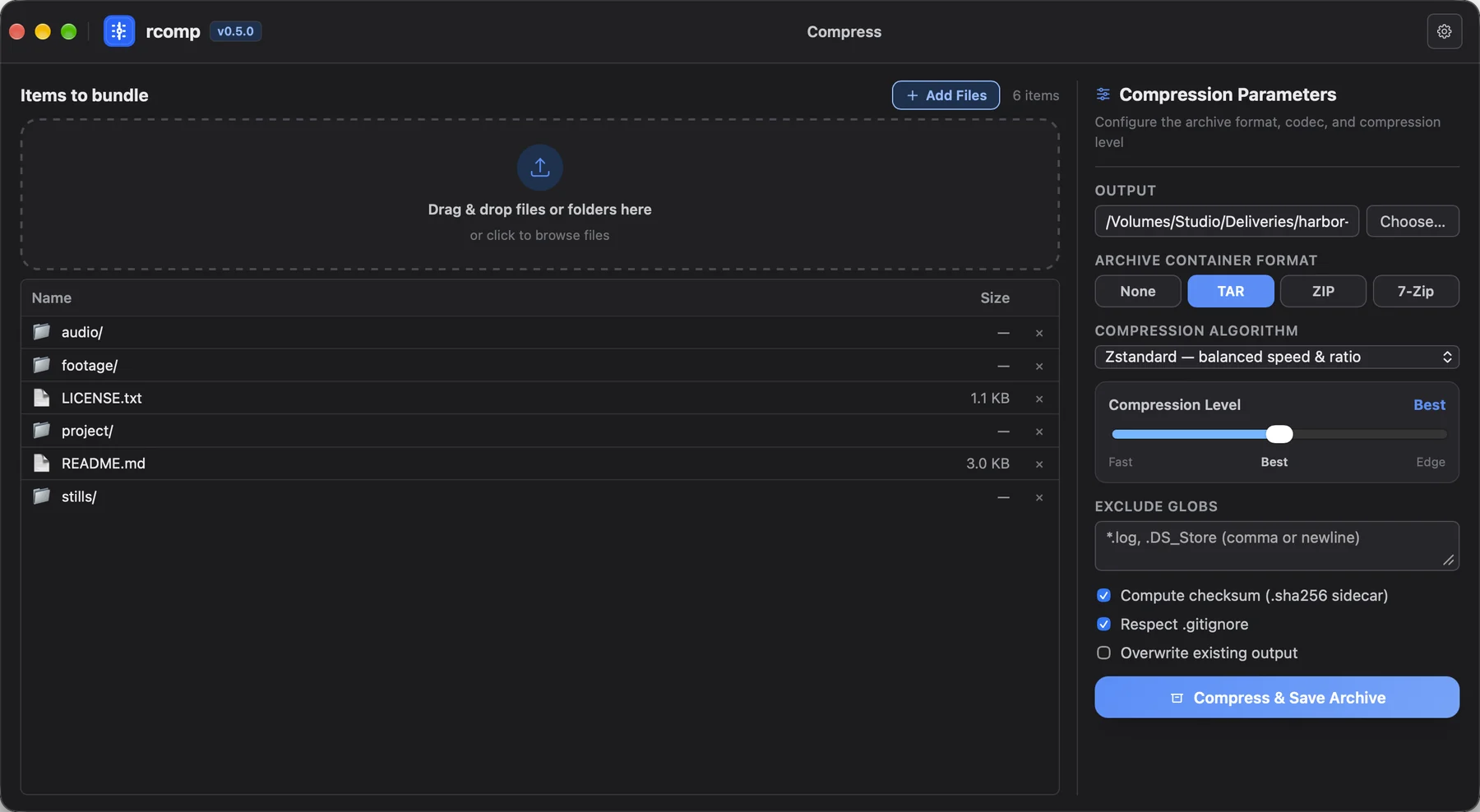
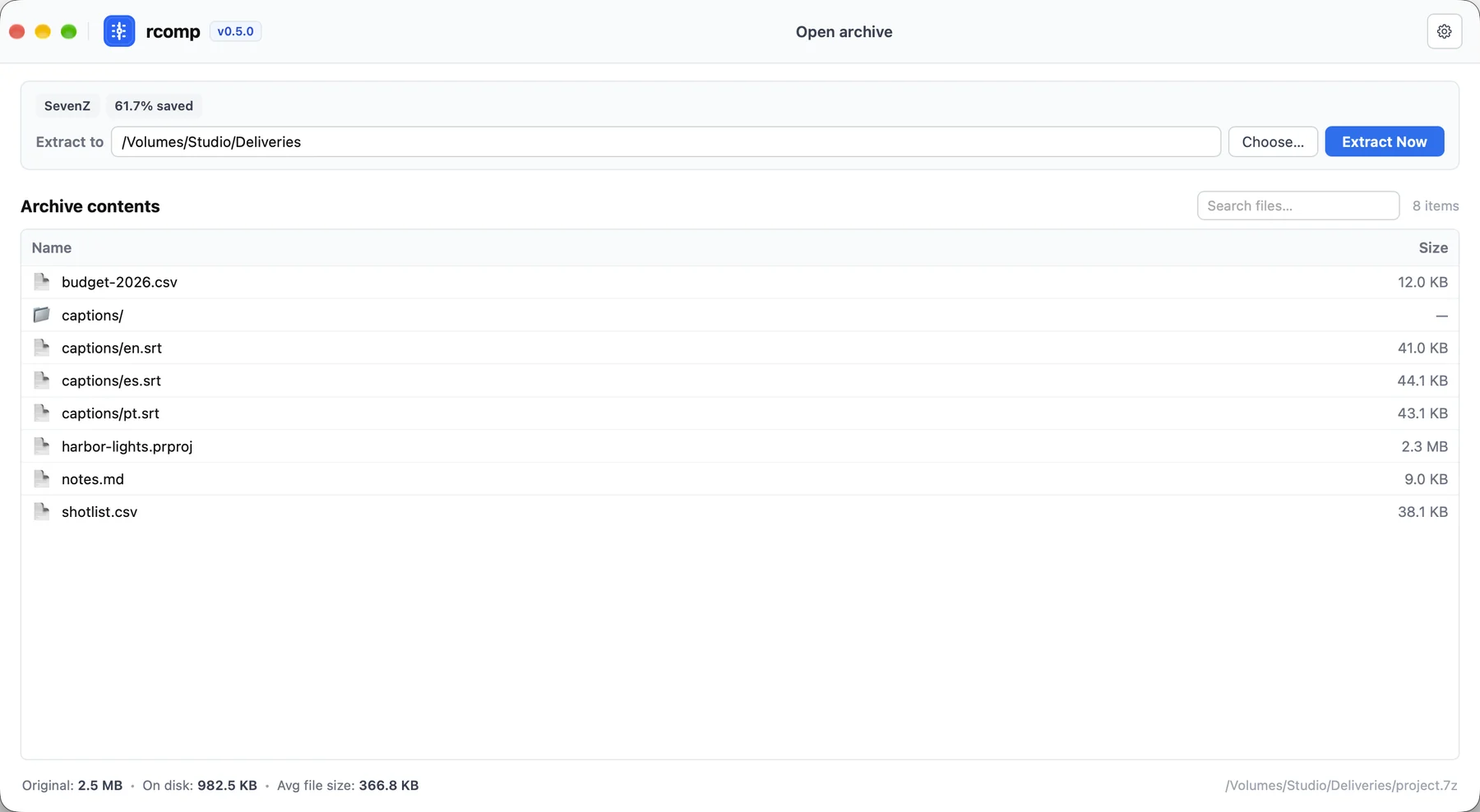
Open an archive to browse it, or drop files and folders to create a new one.

    Rcomp in light mode with a 7-Zip archive open, showing eight entries

    Light and dark appearance

    Appearance follows your OS by default and can be pinned. Settings also holds your default codec, the hardware acceleration mode, and the Add to PATH button.

    System integration

    File manager integration

    Compress or decompress from the right-click menu, preview an archive with Quick Look, or open it with a double-click.

    Context menu

    macOS · Windows · Linux

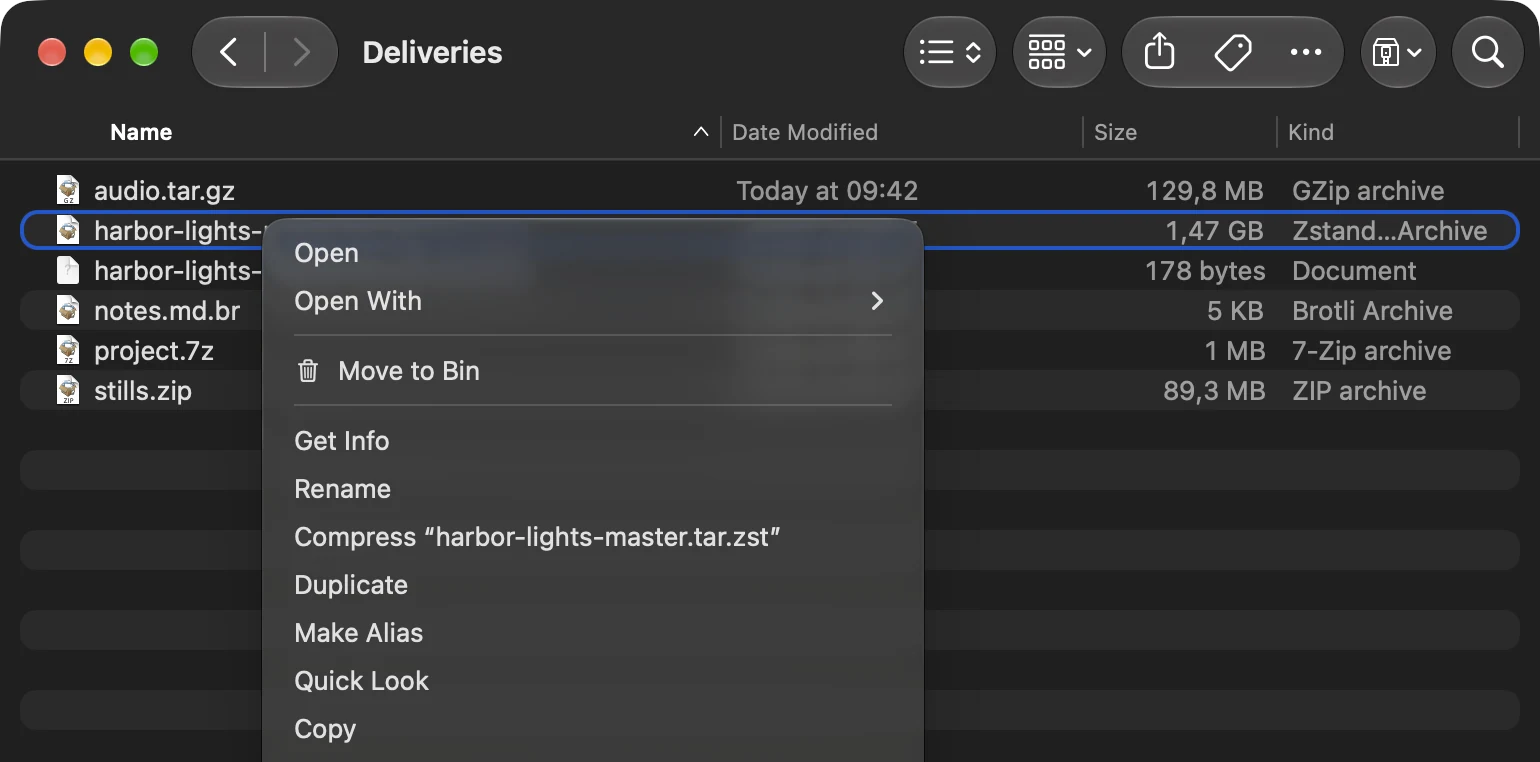
    Decompress with Rcomp extracts each archive next to itself. Compress with Rcomp bundles your selection into a new archive beside it, in your default format, and never overwrites a file.

    Finder window listing audio.tar.gz, harbor-lights-master.tar.zst, notes.md.br, project.7z and stills.zip, with the right-click menu open on the tar.zst archive
    Further down the same menu: Compress with Rcomp, and Decompress with Rcomp highlighted
    Finder's menu on macOS. The middle of the menu is cut out.
    macOS
    Finder Quick Actions
    Windows
    Explorer context menu, set up by the .exe and .msi installers. On Windows 11 it is under Show more options
    Linux
    Dolphin, Nemo and Nautilus, from the .deb and .rpm packages. Nautilus needs python3-nautilus

    Quick Look preview

    macOS 12+

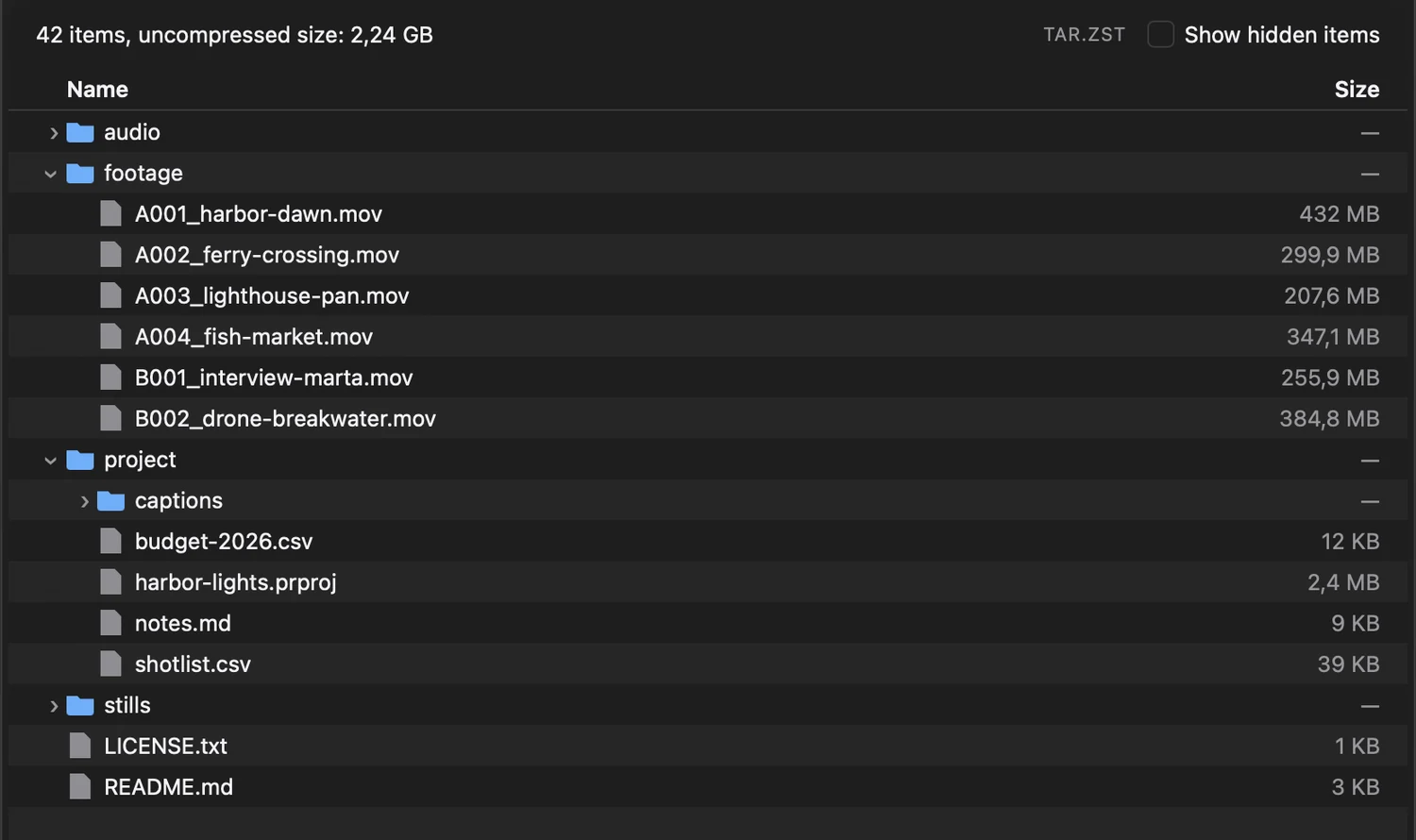
    Quick Look shows an archive's item count, its uncompressed size, and a folder tree with sizes that you can expand, without opening or extracting anything.

    × harbor-lights-master.tar.zst Quick Look
    Quick Look preview: 42 items, uncompressed size 2.24 GB, TAR.ZST, with a tree of audio, footage, project and stills folders; footage and project are expanded to show their files and sizes
    The preview is Rcomp's. The title bar is redrawn here.
    • ✓A Show hidden items switch for dotfiles
    • ✓Works for every format Rcomp opens, compressed tarballs included
    • ·If another archive previewer is installed, macOS picks which one you see

    Open with Rcomp

    Rcomp registers as a viewer for 14 archive types, as an alternative to your current default.

    Edit an archive in place

    Drag entries out to Finder, Explorer or a Linux file manager to extract only those. Drop files onto an open archive, or onto a folder row, to add them.

    Adding works for zip, 7z, tar and compressed tarballs. The archive is rebuilt and swapped in only once it is complete. RAR and single compressed files are read-only.

    Launch flags

    The app takes the same two actions as launch flags, so your own shortcuts and scripts can use them.

    --compress <paths…>
    --decompress <paths…>

    Command line

    One command to compress and extract

    There is no compress or extract subcommand. Rcomp decides from the arguments and the first bytes of the file whether to compress or extract.

    • ✓Formats detected by content first, extension second
    • ✓A folder into .bz2 becomes a tarball, after asking
    • ✓Three levels: --fast, --best, --edge
    • ✓Folders follow their own .gitignore; add --exclude globs or --all
    • ✓--checksum writes a sha256sum-format file; extraction verifies it
    • ✓Ctrl-C removes partial output and exits 1
    • ✓Exit codes for scripts: 0 done, 1 failed, 2 unclear usage
    • ✓Shell completions and a man page built in
    /Volumes/Studio/Deliveries
    $ rcomp "Harbor Lights" harbor-lights.tar.zst --checksum
    harbor-lights.tar.zst  2.08 GiB → 1.37 GiB (65.6%)  in 8.8s
    sha256: fac211815301fa36c5d109c24e55cdeafbd2700ce7f06a081a8205e958611b3c
    
    $ rcomp "Harbor Lights/footage" footage.tar.bz2
    footage.tar.bz2  1.79 GiB → 1.32 GiB (73.8%)  in 9.9s
    
    $ rcomp "Harbor Lights/footage" footage.tar.lz4
    footage.tar.lz4  1.79 GiB → 1.46 GiB (81.5%)  in 5.3s
    
    $ rcomp "Harbor Lights/project" project.7z --edge
    project.7z  2.51 MiB → 982.51 KiB (38.3%)  in 725ms
    $ rcomp harbor-lights-master.tar.zst restored
    verified sha256
    extracted 42 entries to restored/harbor-lights-master  in 9.2s
    
    $ rcomp stills.zip
    extracted 18 entries to ./stills  in 173ms
    
    # The .sha256 file next to the archive was found and checked.
    # stills.zip has one top-level folder, so it isn't wrapped again.
    $ rcomp ls project.7z
           12325  budget-2026.csv
               0  captions/
           42000  captions/en.srt
           45156  captions/es.srt
           44119  captions/pt.srt
         2437173  harbor-lights.prproj
            9262  notes.md
           38998  shotlist.csv
    $ rcomp project/ project.bz2 < /dev/null
    error: the output `project.bz2` will contain a tar archive inside a codec stream (other tools expect a `.tar.*` extension). Stdin is not a TTY — pass -y to auto-accept.
    
    $ rcomp ambience.wav ambience.wav.lz4 --accelerator auto
    warning: no compatible hardware accelerator is available for lz4 encoding at Best level; using CPU
    ambience.wav.lz4  58.00 MiB → 39.02 MiB (67.3%)  in 176ms
    
    # In a terminal the first case is a yes/no question.
    # In a script it is a clear error and exit code.

    Real output from the 0.5.0 build on a 2 GiB sample project. Apple M3 Max.

    rcomp-core

    The Rust library behind the CLI and the app

    The CLI and the desktop app are thin layers over one Rust crate. It never touches a terminal or a window: you pass a progress callback and a cancel token, and it hands back a report.

    src/main.rscargo add rcomp-core
    use std::path::Path;
    use rcomp_core::{CancelToken, CompressOptions, Level, compress, list};
    
    // Clone the token into your Ctrl-C handler.
    let cancel = CancelToken::default();
    
    let report = compress(
        Path::new("photos/"),
        Path::new("photos.tar.zst"), // format from the extension
        &CompressOptions {
            level: Level::Best,
            checksum: true, // SHA-256 while streaming
            cancel: cancel.clone(),
            ..Default::default()
        },
        |p| eprintln!("{} / {:?}", p.bytes_done, p.bytes_total),
    )?;
    
    println!("{} entries in {:?}", report.entries, report.duration);
    
    for entry in list(Path::new("photos.tar.zst"))? {
        println!("{:>12}  {}", entry.size, entry.path.display());
    }
    No unsafe code

    The crate is built with #![forbid(unsafe_code)], and every public item is documented.

    Path traversal protection

    Every entry path and link target is checked before anything is written. Archives can't escape through ../ or symlinks, and setuid bits are dropped.

    No partial output

    Output is staged beside the destination and published once complete. Cancel or fail, and the old file is untouched.

    Partial extraction and adding files

    ExtractOptions::entries extracts a selection. add_to_archive adds files to an existing archive.

    Pluggable acceleration

    GPU providers register with an Engine. The core has no GPU dependency, and a CPU-only build stays CPU-only.

    Build without RAR

    RAR extraction uses the freeware unrar library. Build with --no-default-features to leave it out.

    Formats and levels

    --edge turns on every ratio feature a codec has. tar combines with any codec: .tar.gz, .tar.zst, .tar.br and the rest.

    FormatFiles--fast--best--edgeAll cores

    Speed

    Compression time, 0.4.0 compared with 0.5.0

    We compressed one 573 MiB tar with the released 0.4.0 and with the 0.5.0 build, on the same 16-core laptop. Lower is better.

    Time to compress 573 MiB

    0.4.00.5.0

    Output size

    The output is the same whatever the number of cores. Splitting the input into chunks makes it slightly larger; at the default level:

    Codec0.4.00.5.0Change
    LZ4186.3 MiB186.4 MiB+0.10%
    gzip165.6 MiB166.0 MiB+0.26%
    bzip2140.4 MiB140.5 MiB+0.09%
    brotli --fast178.4 MiB159.8 MiB−10.4%

    How it was measured

    • · Apple M3 Max, 12 performance and 4 efficiency cores, in normal desktop use
    • · Input: a 601,161,728-byte tar of JavaScript packages, warm in the file cache
    • · 0.4.0 from Homebrew against a release build of the 0.5.0 code
    • · Median of three runs. Slow 0.4.0 runs were timed once or twice
    • · zstd and xz are unchanged: both already used all cores

    GPU acceleration

    Experimental GPU compression for LZ4

    Rcomp can compress LZ4 on a graphics card through one portable shader, on Direct3D 12, Vulkan and Metal. It is correct on every GPU we tested. It is also slower than a CPU using all its cores, so it stays opt-in.

    Experimental · opt-in

    LZ4 at the fast level, 559 MiB

    Apple M3 Max, seconds

    Two rows are the lower end of a measured range: one CPU core took 1.07 to 1.21 s, native Metal 0.67 to 0.70 s. The GPU output is also about 7% larger than the CPU's at this level. Each GPU thread works on one 64 KiB block alone, with a simpler match search.

    rcomp-core with optional GPU providers

    rcomp-coreDefault

    CPU codecs on every core. Framing, checksums, ordering and atomic output live here.

    rcomp-wgpuOpt-in

    One WGSL kernel for Direct3D 12, Vulkan and Metal. No vendor SDK to install.

    rcomp-metalOpt-in

    Native Metal on Apple Silicon, kept as the reference to compare against.

    • ✓auto never picks a slower device, and says so when it uses the CPU
    • ✓required fails clearly when no device fits
    • ✓A GPU failure mid-run retries once on the CPU before anything is published
    • ✓Output is a standard LZ4 frame that the reference lz4 tool decodes

    Hardware it has been qualified on

    Qualified means every output decoded with the reference tool and matched the input byte for byte, across block boundaries, incompressible data and inputs larger than one batch. Vulkan on NVIDIA and AMD is still to do.

    cargo install rcomp --features wgpu,metal
    $ rcomp hardware
    provider wgpu — Portable GPU (wgpu)
      device wgpu:metal:0000:0000:0
        name: Apple M3 Max
        backend: metal
        preferred_batch_size: 268435456
        capability: lz4 encoding levels=fast block=65536 maturity=Experimental
        capability: tar.lz4 encoding levels=fast block=65536 maturity=Experimental
    provider metal — Apple Metal
      device metal:4294968963
        name: Apple M3 Max
        unified_memory: true
        capability: lz4 encoding levels=fast block=65536 maturity=Experimental
    
    $ rcomp ambience.wav ambience.wav.lz4 --accelerator required
    error: compress failed: hardware acceleration unavailable: no compatible
    hardware accelerator is available for lz4 encoding at Best level;
    hardware supports lz4 encoding only at Fast level
    hint: use --accelerator auto or --accelerator cpu to run on the CPU
    
    $ rcomp ambience.wav ambience.wav.lz4 --fast --accelerator required
    ambience.wav.lz4  58.00 MiB → 49.75 MiB (85.8%)  in 764ms

    Where GPU compression could help

    At fast levels all CPU cores already outrun most SSDs, so a GPU gains little. The potential is at the slow, high-ratio levels, where even 16 cores drop to tens of megabytes per second.

    All 16 cores, MiB per secondlog scale

    Reference lz4 and zstd tools on the same M3 Max. The right-hand rows are where the next GPU experiments aim.

    Release history

    Seven releases since June 2026

    Every release keeps standard formats, safe extraction, and no partial files on disk.

    Open Southeners
    Dual-licensed MIT or Apache-2.0

    Roadmap

    Under consideration, without dates

    Install

    Install the app, the CLI or the library

    Desktop app

    CLI included

    macOS, Windows and Linux. Signed and notarized on macOS.

    brew tap open-southeners/tap
    brew install --cask rcomp-desktop

    Or download a .dmg, .exe, .msi, .deb, .rpm or AppImage from GitHub Releases.

    Command line

    Homebrew · Cargo

    Only the rcomp command.

    brew install open-southeners/tap/rcomp
    cargo install rcomp
    cargo install rcomp --features wgpu

    The last line adds the experimental GPU provider. Use metal on a Mac for the native one.

    Rust library

    crates.io

    Build your own tool on the same engine.

    cargo add rcomp-core
    cargo add rcomp-core --no-default-features

    The second line leaves out RAR, for projects that need only OSI-approved dependencies.

    Rcomp 0.5.0 for macOS, Windows and Linux